
memost
Memory for most of me.
One local place for my notes, files, and everything else.
memost is a free app for building your own local archive across your devices — with no risk of exposing it to the outside world.
Available on macOS · iOS · iPadOS · Windows — Android coming soon
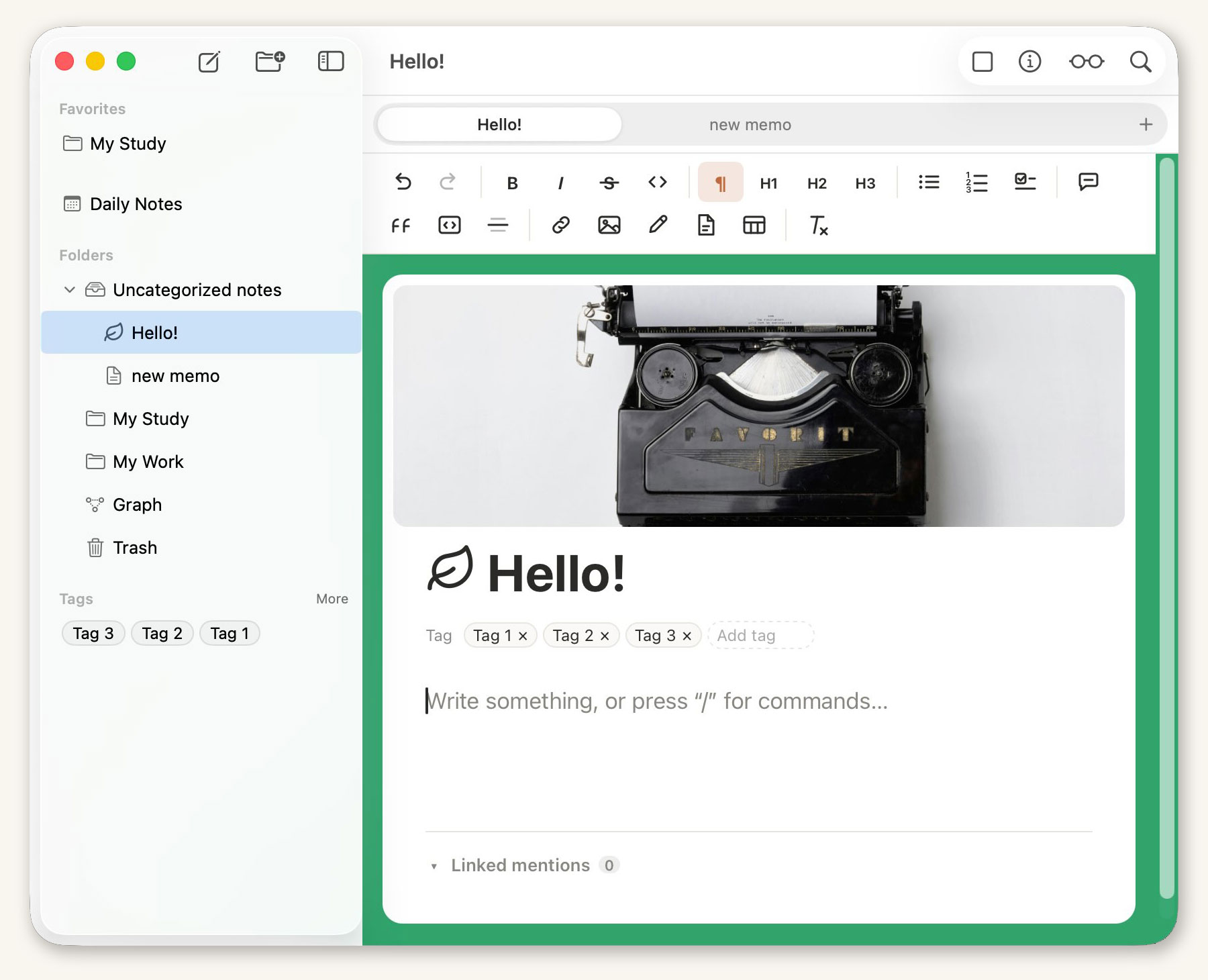
Everything you need to keep records,
right on your device.
What makes memost different.
Block-based editor
Enter any kind of content with ease and restyle it block by block. Move blocks anywhere in the document, and type a slash (/) anywhere while writing to reach styles and commands — just like Notion.
Shortcuts make styling even faster: Cmd+1 (or Ctrl+1) turns a block into Heading 1. To restyle just part of a block, select the text and a quick-edit toolbar appears. A drawing tool lets you add hand-drawn sketches to your notes.
Style your notes, your way
Note width, cover and background images, background colors, fonts, text colors, highlight colors, line spacing, block spacing, zoom — make every note look exactly how you want.
You can even edit the theme CSS directly to build your own default theme!
Attach any file
Stop keeping your notes and their related files in separate places! Store any file in a note or folder — drag one in from Finder and it attaches right where you dropped it.
Images show up right inside your notes, and a PDF can be highlighted and drawn on in place, with your markings saved into the file. Attach anything and open it whenever you like — Word or PowerPoint files open in their own apps for editing and saving.
Multi-panel view
Open up to four documents side by side! Compare translations or related documents at a glance.
Tap the square icon at the top right of the screen to switch panels. (iPad supports dual panels; multi-panel is not available on iPhone.)
Local storage
Stop worrying about your data leaking from someone's cloud! memost stores your data only on your device, and note contents are kept safely encrypted. Attached files are kept as the original files so another app can open and edit them in place.
P2P sync
Your MacBook, iPad, and iPhone sync automatically by exchanging data directly, peer to peer. Just keep the app open on devices on the same LAN or Wi-Fi network and they sync fast — notes always travel encrypted.
Link your documents
Link to other documents from within a document, Notion-style, or embed external links in your notes — as plain links or rich bookmarks.
Import support
Bring documents you made in other apps into memost as notes. Support for more formats is on the way.
Supported today: enex (Evernote), html (web pages), epub (ebooks), md (Markdown), ppt/pptx, and mmp (memost export/import). Point it at a folder and the whole thing comes in.
Reading mode
When you want to focus on reading, or present without distractions, click the eyeglasses icon. Editing locks and you can only scroll and read.
On iPad, pinch with two fingers to make the text larger or smaller.
Records as a table.
Every row is a note.
Books you have read, contacts, work in progress — anything where the same kind of entry repeats belongs in rows and columns. A database row is itself a note, so opening one opens the block editor you already use.
Switch the same records between table, board, gallery, calendar and timeline, and save sorting and filters together as views you move between with tabs. Relation, backlink, formula and rollup columns tie databases to each other.
Your records stay on your device.
Encrypted and safe.
memost never uploads your data to a cloud server. Everything lives inside a vault on your own device, and note contents are stored encrypted. Attachments are kept as the original files so you can open and edit them in other apps — the privacy policy spells this out.
Journals, work notes, important files — record them all with peace of mind, free from any worry about leaks.
No servers.
Devices sync directly.
Put your MacBook, iPad, and iPhone on the same LAN or Wi-Fi network, keep the app open, and they find each other and sync quickly — exchanging data directly, peer to peer.
Synced notes are always delivered encrypted.
- Ask to join from the new device with the five-word key phrase generated automatically for your vault, and
- approve it on a device you already use — that's it. The vault password is never typed into the new device.
Start using memost today
Free on macOS, iOS, iPadOS, and Windows.
macOS
Download (.dmg)iOS · iPadOS
Join the TestFlight betaWindows
Download (.exe)Android
Coming soonAfter installing, see the manual to get started.